Go Speed: Street Rider
- 3.9
- Rating
- 1.00M
- Installs
- Free
- Price

 Analysis by App-foxy
I approached Go Speed: Street Rider as a quick racing game rather than a full driving simulator, and that distinction shaped my experience from the first session. Its appeal is immediate: get into the action, react to the road, and try to turn a short burst of play into a cleaner, faster run. Developed by SoftAIO, this free racing title is aimed at players who want a straightforward way to fill a few spare minutes without committing to a long campaign or a complicated garage-management routine.
That simplicity is both its strongest quality and its clearest limitation. I found it easy to understand, but players looking for deep vehicle tuning, a large competitive ecosystem, or a highly realistic driving model may want something more specialized. The game is listed for Everyone 10+, runs on Android 7.0 or later, and its current version is 1.0.2. Those details make it accessible to a broad range of devices, although the actual feel of play still depends on how comfortably your phone handles touch controls and fast visual movement.
How I settled into the baseline driving workflow
My most reliable routine was to treat each run as a small practice session instead of chasing a perfect result immediately. I started by learning how the road presents itself, then paid attention to the timing of turns, traffic or obstacles, and the amount of correction needed after each movement. That approach sounds basic, but it matters in a game built around quick reactions. Random swipes and rushed decisions usually created more problems than the road itself.
You May Also Like

 Blood Strike: 2.5 Anniversary
Blood Strike’s Loadouts Turn Every Drop Into a Tactical Gamble
A close look at Blood Strike’s custom loadouts: how fast access to signature weapons reshapes its battle royale rhythm, rewards preparation, and narrows the gap between fights.

 Pandora - Music & Podcasts
Pandora’s Music Is Easy to Start, but Harder to Recover
Pandora’s strength is its low-effort path from a seed to a station. Its weak spot is how much confidence it asks you to place in connection, setup, and quiet recovery.

 8 Ball Pool
 Is Built on Rivalries, Rematches, and Routine
A close look at the rivalries, rematches, shared routines, and unanswered safety questions that turn a quick pool match into a persistent mobile community.

 Samsung Music
’s Quiet Strength Is Playing What You Already Own
Its reach comes less from spectacle than from dependable access to a personal library. That simplicity is both the app’s strongest retention engine and its ceiling.

 AccuWeather: Weather Radar
AccuWeather Review: A Quick, Clear Forecast for Everyday Decisions
For everyday plans, the best forecast is the one you can understand quickly. AccuWeather makes rain timing, radar, and local conditions easy to act on, with a few trade-offs.

 Hill Climb Racing
Why Hill Climb Racing Still Turns Crashes Into One More Run
A tiny car, a bumpy hill and one more upgrade: Hill Climb Racing keeps resurfacing because its simple chaos makes every near-miss feel personal.
More From Our News Desk



The first few attempts are best used to establish a comfortable hand position. I kept the phone steady, avoided covering too much of the screen with my thumb, and used small movements rather than dramatic gestures. This helped me see more of the route and reduced the common mistake of overcorrecting. If you are playing while standing on public transport or walking between tasks, the game is less forgiving because a small physical jolt can turn a reasonable input into a poor one.
A useful everyday scenario is a short break between appointments. I could play a run, notice one specific mistake, and try again with a single adjustment. That makes the game more satisfying than a racer that demands a long uninterrupted session. It also gives the experience a natural rhythm: play, identify the error, repeat, and stop when concentration starts to fade.
I would not begin by treating every run as a test of speed. In the early stage, consistency is more valuable. A slower line that keeps the vehicle stable teaches more than a fast attempt that ends before you understand why it failed. Once the basic movement feels predictable, speed becomes easier to build because you are no longer spending every second correcting the same habit.
The game’s short store wording, “Go Speed,” captures its direct attitude, but it does not explain the practical difference between reckless acceleration and controlled progress. I enjoyed it most when I focused on reading the road slightly ahead of the vehicle. Looking only at the immediate foreground made my reactions late; scanning farther forward gave me time to prepare instead of panic.
What I changed before trying to improve
Before working on faster runs, I made sure the phone was held in a repeatable position. This is an overlooked advantage in touch racing. If your grip changes from one attempt to the next, it becomes difficult to tell whether a result came from better driving or simply better physical control of the device. A stable posture also makes longer sessions less tiring.
I then played several attempts without trying to beat my previous result. My goal was to notice where attention dropped. In my case, mistakes were more likely after a successful sequence, when I relaxed too early. That led me to keep the same level of focus after a clean section rather than celebrating halfway through a run.
This is one of the game’s more useful lessons: the best improvement often comes from removing one repeated error, not from making every action faster. I recommend choosing a single target for a session, such as smoother steering or earlier preparation, and ignoring the rest. It makes progress easier to recognize and prevents the controls from feeling chaotic.
Settings and device habits worth checking
Because this is a touch-based racing game, I would check the practical setup before blaming the driving. Screen brightness, accidental touch protection, and the way the phone is held can all affect a fast session. I also prefer playing with notifications silenced, since an incoming banner or vibration can interrupt the visual rhythm at exactly the wrong moment.
I did not find value in changing several things at once. If the game offers control or display choices on your device, test them individually and give each arrangement enough runs to judge fairly. A setting that feels strange in the first minute may become comfortable after practice, while a layout that feels immediately familiar may encourage larger movements than necessary.
Players using an older phone should pay attention to responsiveness rather than expecting the minimum operating-system requirement to guarantee identical performance everywhere. Android 7.0 compatibility makes the title broadly reachable, but age, background activity, and screen sensitivity can still influence how accurately inputs register. Closing demanding apps before playing is a sensible habit, especially if your device already feels warm during ordinary use.
I also recommend checking whether your fingers are leaving the screen clean and dry. This sounds trivial, yet racing games magnify small friction problems. A thumb that drags inconsistently can make the same gesture feel different from one attempt to another. For serious practice, a clean screen and a consistent grip are more useful than repeatedly changing your technique.
The game is free to download, with in-app purchases ranging from $0.99 to $19.99 per item. I would approach those purchases carefully. First decide whether the basic driving loop holds your attention without spending anything. If the core controls do not feel satisfying, paid additions will not solve that problem. If you enjoy the loop, set a personal limit before browsing purchase options so that convenience does not quietly replace practice.
That free-to-start structure makes the game easy to try, but it also means the value depends on what you want from a mobile racer. Someone seeking a casual diversion may find the entry point appealing. A player comparing it with a premium racing game should judge not only the initial cost, but also how much depth, variety, and long-term progression they expect from the experience.
Faster patterns that improved my runs
Once I understood the baseline workflow, I started using repeatable patterns instead of reacting to every moment as if it were new. The first was “look, prepare, correct.” I looked toward the next important section, prepared the input before reaching it, and used a smaller correction afterward. This was more reliable than waiting until the vehicle was already in trouble.
The second pattern was to avoid stacking decisions. When a turn or obstacle demanded attention, I concentrated on completing that action cleanly before planning the next one. Trying to steer, accelerate, and anticipate several hazards simultaneously made my play less precise. Breaking the sequence into manageable decisions kept the run calmer without making it feel slow.
A third useful habit was reviewing the cause of a failed attempt immediately. I asked myself whether I reacted late, moved too far, or lost focus after a successful section. That quick diagnosis prevented me from repeating the same attempt mechanically. If I could not identify the cause, I played one slower run to gather information rather than forcing another speed attempt.
Experienced players will probably benefit from creating a personal reset rule. Mine was simple: after two careless failures caused by the same mistake, I stopped trying to go faster and returned to controlled movement. This avoids the familiar cycle where frustration leads to harder inputs, harder inputs lead to more failures, and the player concludes that the game is inconsistent when the real issue is fatigue.
I also found that short sessions produced better results than marathon attempts. Racing requires visual attention, and that attention fades before the player always notices it. A brief pause can restore accuracy more effectively than another dozen rushed runs. For a game designed around quick access, this is not a drawback; it is a sensible way to use it.
Compared with more elaborate racing alternatives, Go Speed: Street Rider feels less like a long-term motorsport hobby and more like a focused reflex exercise. Traditional racers may offer licensed cars, detailed upgrades, broad tracks, or online competition. Those features create a stronger sense of ownership, but they also bring menus, waiting, and more systems to manage. Here, the trade-off is a tighter loop that is easier to pick up but may become repetitive for players who need constant progression.
Arcade racing games with more dramatic effects can deliver a bigger first impression, while this title is better suited to someone who enjoys refining a small set of actions. I would choose it over a menu-heavy alternative when I have only a few minutes. I would choose the larger game when I want a substantial evening session, a deeper collection system, or a more convincing simulation of driving.
Where the game reaches its advanced limits
The main advanced challenge is not discovering a secret technique; it is maintaining precision when the obvious route is no longer enough. Small timing differences matter more once basic control becomes familiar. At that point, improvement comes from cleaner preparation, fewer unnecessary corrections, and better concentration across the entire run.
That ceiling may be satisfying for players who enjoy self-imposed goals, but it can also expose the game’s limits. Without a deep set of systems to study, mastery depends heavily on repeating the driving loop and refining personal execution. Players who expect extensive customization or a wide range of strategic choices may find that their interest fades after the initial learning period.
I would also skip this game if your priority is realistic driving behavior. Its strongest identity is quick arcade-style racing, not a detailed lesson in vehicle physics. Likewise, it is not my first recommendation for someone who wants social competition, a narrative campaign, or a large collection of cars to build over time. A more feature-rich racer would be a better match in each of those cases.
On the other hand, the game fits people who like measurable personal improvement without needing a complicated interface. It works for a younger audience within its Everyone 10+ rating, for casual players who want short sessions, and for experienced mobile gamers who enjoy testing their reaction discipline. Parents should still remember that optional purchases are available, so device-level purchase controls are worth considering before handing the phone to a child.
The developer, SoftAIO, has positioned the release as a compact speed-focused experience rather than an overloaded racing package. With over 50K installs, it has reached a modest audience, and the current version gives new players a clear starting point. I would keep expectations proportional to that scale: this is something to try for its immediate driving loop, not a substitute for a major console-style racing production.
One practical tip is to decide what “better” means before each session. It could mean surviving longer, steering more smoothly, or finishing with fewer corrections. That simple definition makes the game feel more purposeful. Without it, every attempt becomes a vague chase for speed, and vague goals are difficult to improve.
My mastery verdict after repeated sessions
Go Speed: Street Rider is at its best when you treat it as a disciplined pick-up-and-play racer. I liked the direct access, the short-session potential, and the way small changes in timing could make a run feel noticeably cleaner. The experience rewards calm hands and repeatable habits more than frantic movement, which gives it more substance than its brief store summary suggests.
Its weaknesses are equally clear. The straightforward design may not hold players who need extensive progression, realistic handling, or a large competitive community. The presence of optional purchases also means I would test the free experience carefully before spending. For some users, the lack of deeper systems will feel refreshingly focused; for others, it will feel like the game stops developing just when the basic controls become comfortable.
I would recommend it to a friend who wants a free racing game for short breaks and enjoys improving through repetition. I would suggest starting with stable handling, checking the phone setup, and using each failed run as information rather than immediately pushing for more speed. Those habits reveal the game’s strongest side and reduce the frustration that comes from treating every attempt as a final exam.
Released on Aug 4, 2026, the game is still a relatively focused choice in the racing category. Its age rating of Everyone 10+ makes it approachable, while its Android 7.0 minimum keeps the technical entry point broad. For me, the final decision is simple: choose it when you want an uncomplicated street-racing session that rewards sharper reactions, and look elsewhere when you want a complete driving world with extensive systems.
After spending time with it, I see the title as a compact practice ground rather than an all-purpose racing replacement. That is not a criticism if your needs are modest. In fact, the narrow focus is exactly why I could return to it easily. If your ideal mobile racer is quick to launch, easy to understand, and satisfying to refine one run at a time, this is worth trying.
FAQs for Go Speed: Street Rider
01What is Go Speed: Street Rider?
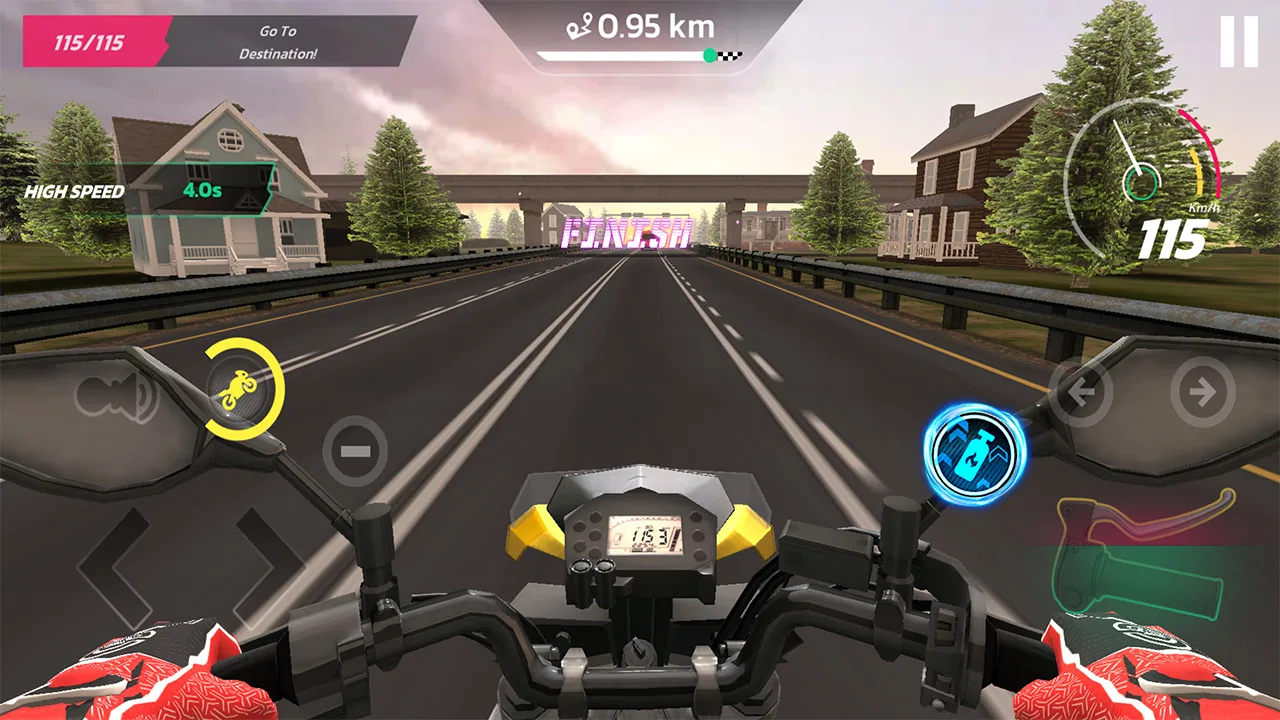
Go Speed: Street Rider is a mobile racing game focused on fast-paced street driving, traffic-filled roads, and vehicle customization. After testing it, the game feels designed for short, action-packed sessions rather than a realistic racing simulation. Players can drive through different environments, avoid obstacles, compete for better times or scores, and gradually improve their cars through progression and upgrades.
02Is Go Speed: Street Rider free to download and play?
The game can generally be downloaded and played without an upfront purchase, although the exact availability may depend on your Android or iOS region. As with many free racing games, optional advertisements, rewards, upgrades, or in-app purchases may be included. Before downloading, check the store listing for current pricing, supported devices, and whether purchases or advertising are mentioned for your version.
03Does Go Speed: Street Rider require an internet connection?
Some parts of Go Speed: Street Rider may work without a constant internet connection, which is useful when playing during travel or in areas with weak coverage. However, advertisements, online features, cloud-related services, updates, and purchase verification may require connectivity. For the most reliable experience, launch the game once while online and review its behavior before relying on offline play.
04What gameplay and controls does Go Speed: Street Rider offer?
Go Speed: Street Rider uses a straightforward control system intended to make driving accessible on a touchscreen. Depending on the selected settings, steering may rely on tilting, touch buttons, or on-screen controls, while acceleration and braking are kept simple. The main challenge comes from reacting quickly to traffic, obstacles, turns, and changing road conditions while maintaining speed.
05Is Go Speed: Street Rider suitable for children and low-end phones?
The game is relatively easy to understand, but parents should still review its age rating, advertising, privacy information, and any optional purchases before allowing children to play. Performance can vary between devices: newer phones should provide smoother visuals and loading, while older or entry-level models may experience reduced frame rates, longer loading times, or limited graphics settings.
Pros
- Fast-paced races are easy to start
- even for casual players.
- Short events fit well into quick gaming sessions.
- Traffic-filled roads create constant tension and reaction challenges.
- Vehicle upgrades give progression beyond simply winning races.
- Bright visuals make the street-racing action easy to follow.
Cons
- Frequent traffic collisions can feel frustrating during difficult races.
- Progress may become repetitive after mastering the early events.
- Some upgrades can require considerable time or in-game currency.
- Controls may feel overly sensitive on smaller phone screens.
- The game can become demanding on older or less powerful devices.

Go Speed: Street Rider
Gallery